Loading your records…
To do
Checked when you open the appAdd your own reminder
Rain and weather
Shift herds
One tap moves a herd and closes its current paddockFeed runway
All grass and stored feed against what the herds eat each dayFeed wedge
Paddocks from longest to shortest grass, against the target linePaddocks in use
Days of grass left at today's intakeResting
Ready when rest target is metSpend by month
Last 6 months, all herdsMove a herd
Recording a move closes the herd's current paddock on the same date.
Grazing log
Cost per head per day
Costs not tied to a herd (fuel, lease, shared hay) are split across herds by head count.
Cost per calf weaned
Last 12 months of costs against the herd's weaning figuresMilk solids
Dairy farms. Beef farms can skip this.Enter kg MS from your tanker docket each day, or one total from your monthly statement (date it the last day of the month). Cost per kg MS is every cost in the period divided by the milk solids in the period, so enter the milk for the whole period.
Hay & feed on hand
Dry matter is the part of the feed that isn't water, and it's what the cows actually live on. You don't need to know it: pick your feed from the list and a typical weight and dry matter fill in for you. If your supplier gave you a feed test, use the dry matter % from that instead. Update the count as you feed out.
Add a cost
All costs
Add a herd
Herds
Weigh days
Beef and young stockWeigh the mob, or a fair sample of it, and enter the average. From the second weigh day on, the app shows the gain per head per day and what each kg of gain cost. Saving also updates the herd's average weight, so feed demand stays right.
NAIT: cattle and deer
Moves, deaths and calves, with the legal deadline for eachRules from OSPRI's guide for lifestyle farmers and dead animals guide. This list is your own reminder; the legal record is the one in NAIT online. Picking a herd also updates its head count.
Add a paddock
No plate meter? Pick what the grass looks like and the app uses a typical figure. Rest days are how long the paddock needs to regrow before the cows come back; the season suggests a starting point, and grass is ready again at about 3 leaves.
Add many paddocks at once
Area in , cover in . You can copy the columns straight from a spreadsheet.
Farm walk
Once a week, check every paddock and save onceA farm walk is walking the farm, usually once a week, to see how much grass is in each paddock. That amount is called the cover: kilograms of dry grass per hectare. About 1,500 is a paddock the cows just left, and about 3,000 is a paddock ready to graze. Pick what each paddock looks like and the app works out the cover, how fast your grass is growing, and which paddock to graze next.
Paddocks
Record fertiliser or effluent
The rate and price fill in for you; change either if yours is different. Cost works itself out from rate × area × price, and you can overwrite it. A cost entered here is also added to your costs as Fertiliser & effluent. Effluent is recorded as depth in mm (1 mm on 1 ha = 10 m³).
Nutrients applied, last 12 months
kg perApplications
What to aim for
There is no single best mix for every farm. Nitrogen drives grass growth, while phosphorus, potassium, sulphur and lime only lift growth when a soil test shows they are short. The usual approach is to test the soil, keep P, K, S and pH in the ranges below, and use N to fill feed gaps.
Weather jobs this week
From the hourly forecast. Tap a day to see why.Go, Watch or Hold for spraying, urea and effluent. Low, Watch or High for facial eczema, frost and cold snaps. Each call is a written rule with the numbers shown, so check it against what you see on the farm.
Change the rules
Where the rules come from
- Spraying: wind 1–6 m/s (4–22 km/h) and Delta T under 8 °C, from Otago Regional Council's spray rules. Delta T under 2 °C and 6 dry hours after spraying are starting points; follow the product label.
- Urea: 10 mm of rain within 8 hours of spreading cuts ammonia loss to about 8% of the N; after 24 hours rain barely helps (Ballance and Landcare research).
- Effluent: no ponding and no more than 25 mm per application (Waikato Regional Council; check your own consent). The 10 mm rain limit is a starting point.
- Facial eczema: nights of 12–13 °C for several nights drive spore growth, January to May (Beef + Lamb NZ). Get spore counts done to confirm.
- Frost (2 °C or below) and cold snaps (under 5 °C, raining and wind 20 km/h or more for 6 hours) are starting points to tune for your farm.
Check a hive
Big buttons for gloves: tick what you saw, then saveHives
Annual Disease Return
Add a hive
Hive checks
Rules and settings
- Every beekeeper must register their apiaries and file an Annual Disease Return between 1 April and 1 June. It counts colonies held at 31 March and lists hives bought or sold and any AFB found in the last 12 months (AFB Management Agency). File it on HiveHub.
- AFB must be reported to the Management Agency within 7 days of finding it (reporting AFB). Keep the hive closed until it's sorted.
- Mites: 3 per 100 bees is a common point to treat; your bee club or mentor may use a different number for the season. Hives not checked in 21 days between September and April show on the To do list.
Gear and jobs
Quad, tractor, pump, fences: when each was last done and when it's next dueLog a job
Add gear
Job history
Farm settings
New Zealand settings (the default): hectares, kilograms, kg DM/ha covers, NZ$, and grazing down to a 1,500 kg DM/ha residual. US settings: acres, pounds, 1 animal unit = 1,000 lb, and 50% utilization (take half, leave half).
Prices in your country
Prices fill in the fertiliser cost and show next to costs and feed you pick. Every price links to where it came from. They're a guide only, so type your own price when you have one; the app remembers it.
Your records
Everything you enter stays on this phone or computer. Back it up now and then, and use the backup file to move to a new device.
How it works
Set the app up once in the order below, then use it day to day. Tap a step to open it. Every step has a worked example from a 300-cow farm so you can see what to type and what the app does with it. Your records stay on this phone, and nothing is sent anywhere.
Setting up (once)
1Check your settings
Open Settings and give the farm a name. NZ is already set: kilograms, hectares, NZ$, and a 1,500 kg DM/ha residual (what you leave behind after grazing). Tap "Use this phone's location" while you're on the farm so the app can show your rain forecast.
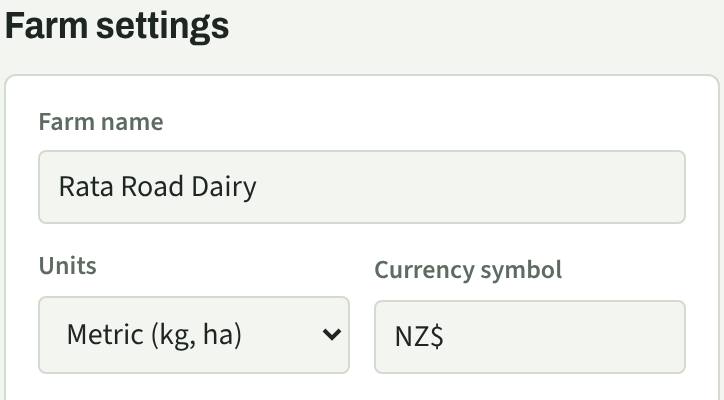
Why it matters: the residual decides how much grass counts as food. A paddock at 3,100 kg DM/ha grazed down to 1,500 gives the cows 1,600 kg DM/ha.
2Add your herds
On Herds, add each mob you graze separately: a name, how many head, average weight and the class (pick from the list or choose "Other: type it in").
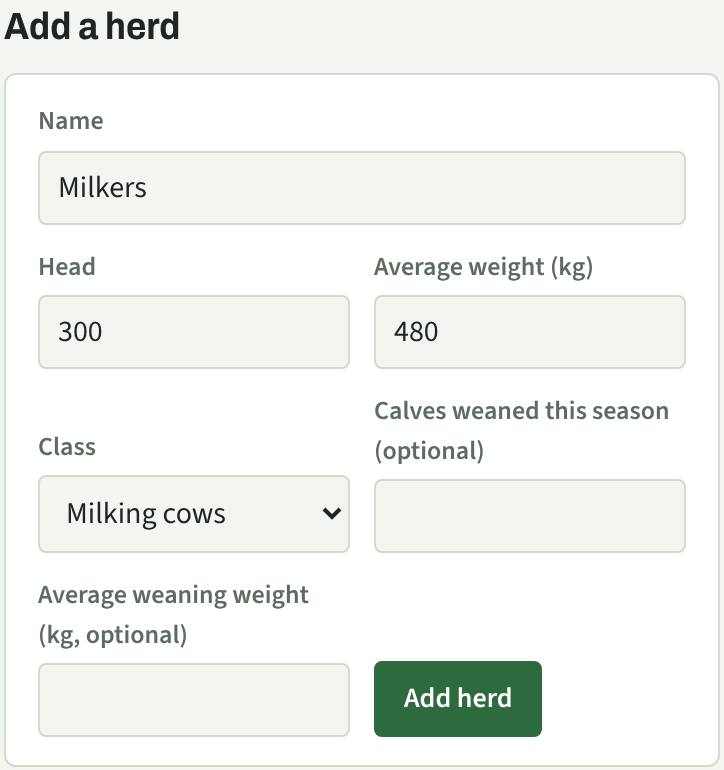
What the app works out: each cow eats about 2.6% of her weight in dry matter a day. 480 kg × 2.6% = 12.5 kg DM per cow, so 300 cows eat about 3,740 kg DM a day.
3Add your paddocks
On Paddocks, add each paddock with its name and size in hectares. For the grass, pick the description that matches what you see, or "I measured it" if you have a plate meter figure. Rest days are suggested for the season.
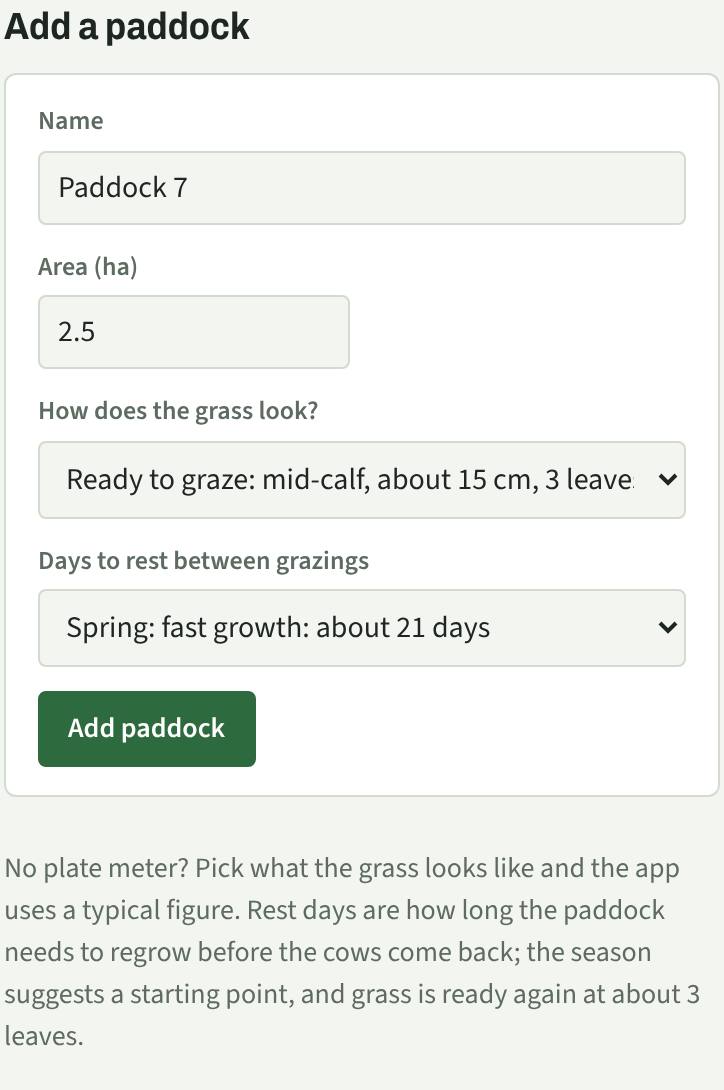
What the app works out: (3,100 − 1,500) × 2.5 ha = 4,000 kg DM to eat. At 3,740 kg a day the Milkers get about one day out of it.
Lots of paddocks? Use "Add many paddocks at once" and paste one per line: Paddock 7, 2.5, 3100
4Record the feed you have stored
On Feed & costs, under "Hay & feed on hand", pick what it is and how many. Weight and dry matter fill in for you; change them if yours differ.
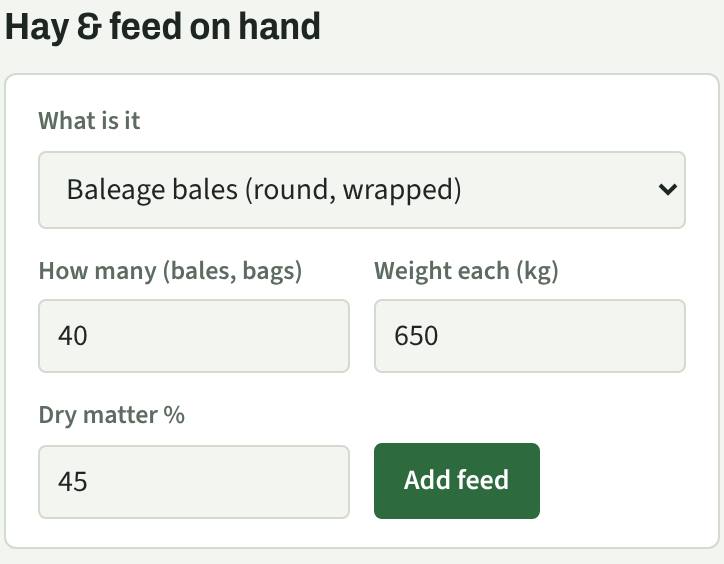
What the app works out: 40 × 650 kg × 45% = 11,700 kg DM, about 3 days of feed for the Milkers on its own. This adds to the "Feed runway" on Overview.
Every day
5Shift the herd
On Overview, "Shift herds" suggests the next paddock (the one with the most grass that has rested long enough). Tap Move today, or use Grazing → "Move a herd" to pick the paddock and date yourself.
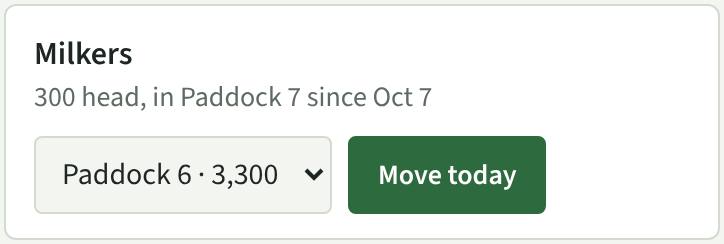
What the app does: it closes the herd's last paddock and starts its rest clock. Paddock 7 shows in "Paddocks in use" and the paddock you left goes to "Resting" with the date it's ready again.
Every week or two
6Do a farm walk
Walk the farm and look at each paddock. On Paddocks → "Farm walk", pick how the grass looks for each one (the cover), then Save covers. You can skip paddocks you didn't see.
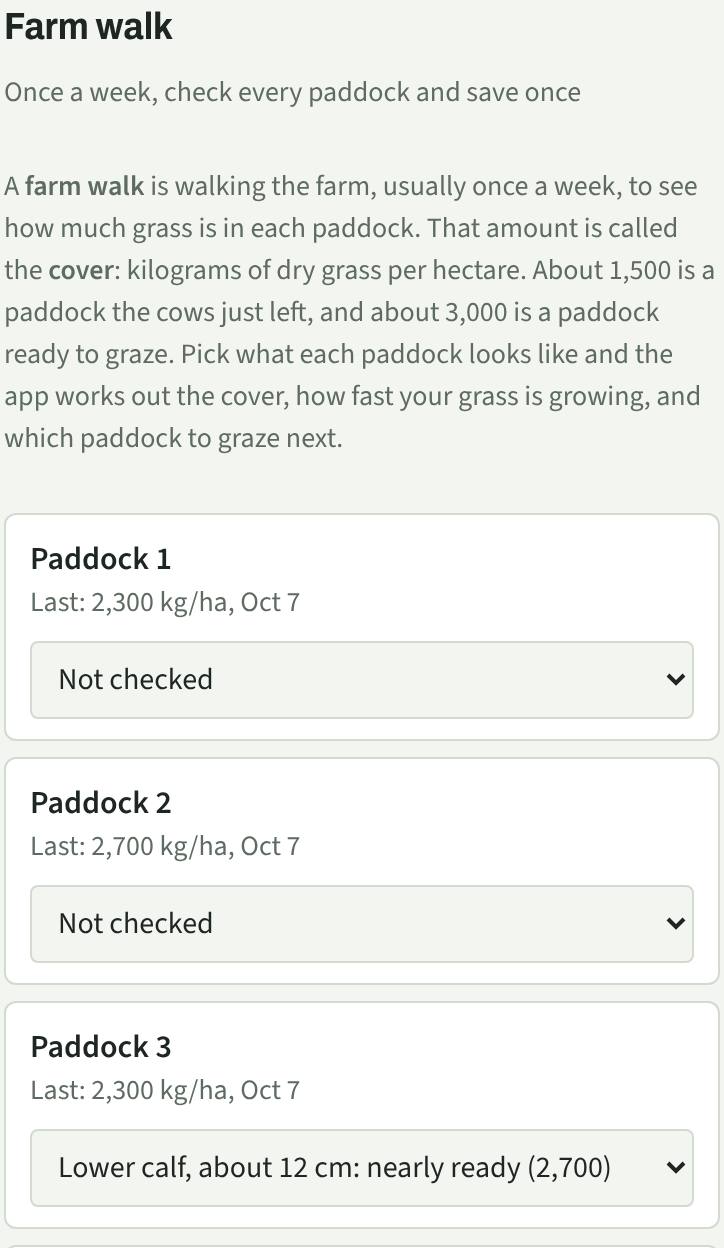
What the app works out: (2,700 − 2,300) ÷ 7 days = about 57 kg DM/ha a day of growth. It compares farm growth with what your herds eat per hectare, so you can see if you're gaining or losing grass. Paddocks grazed between walks are left out.
When it happens
7Add costs
On Feed & costs → "Add a cost", enter the date, category, which herd (or all herds), what it was, and the amount.
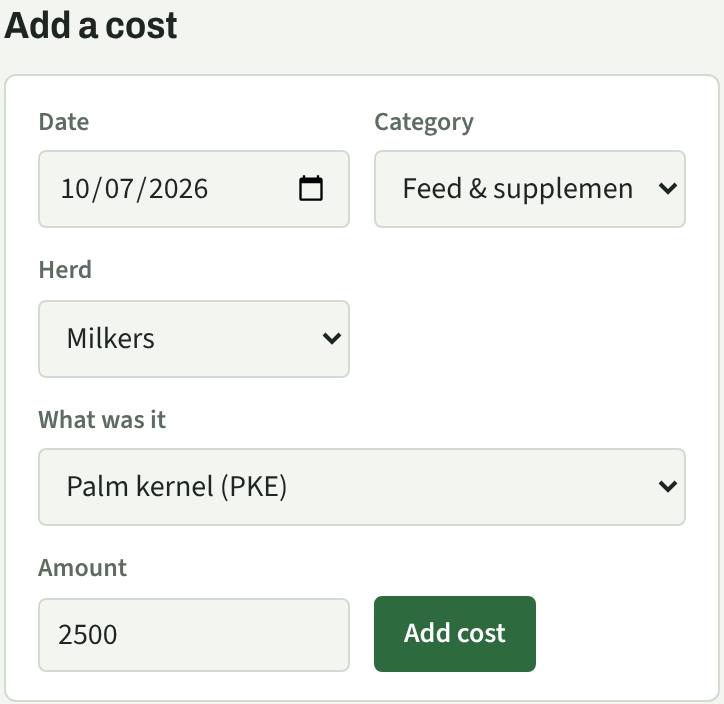
What the app works out: cost per head per day. If the Milkers cost $9,000 over 30 days: $9,000 ÷ 300 cows ÷ 30 days = $1.00 per cow per day.
8Record milk solids (dairy)
On Feed & costs → "Milk solids", enter the kg MS from your tanker docket each day, or one total from your monthly statement. Beef farms can skip this step.
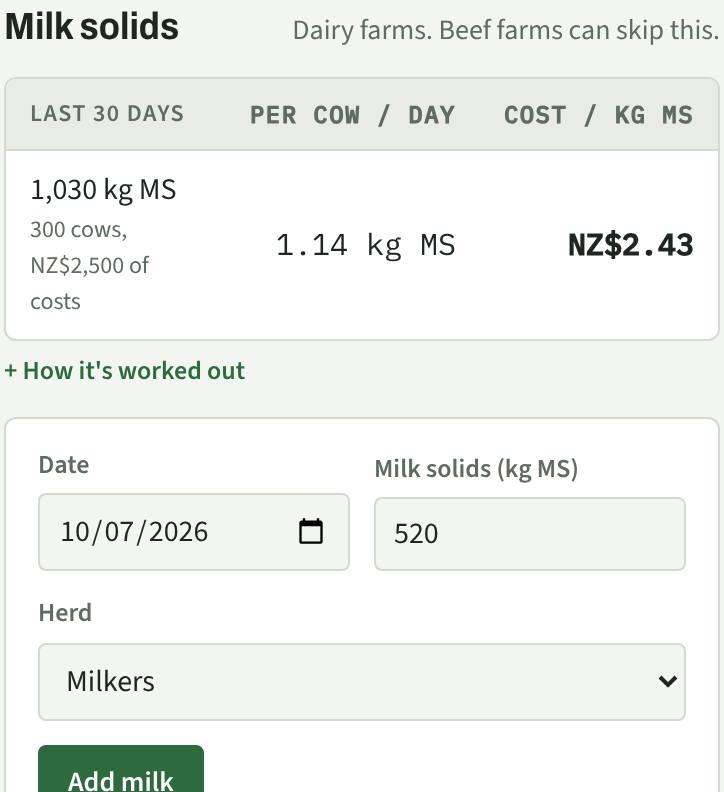
What the app works out: cost per kg MS and kg MS per cow per day. If you recorded $40,200 of costs and 14,900 kg MS over 30 days: $40,200 ÷ 14,900 = $2.70 per kg MS. It only counts costs you've entered, so add wages, feed and power for the full picture.
9Weigh beef and young stock
On Herds → "Weigh days", enter the date, how many head went over the scales and their average weight. Do it each time you weigh. Dairy farms can skip this step unless they weigh young stock.
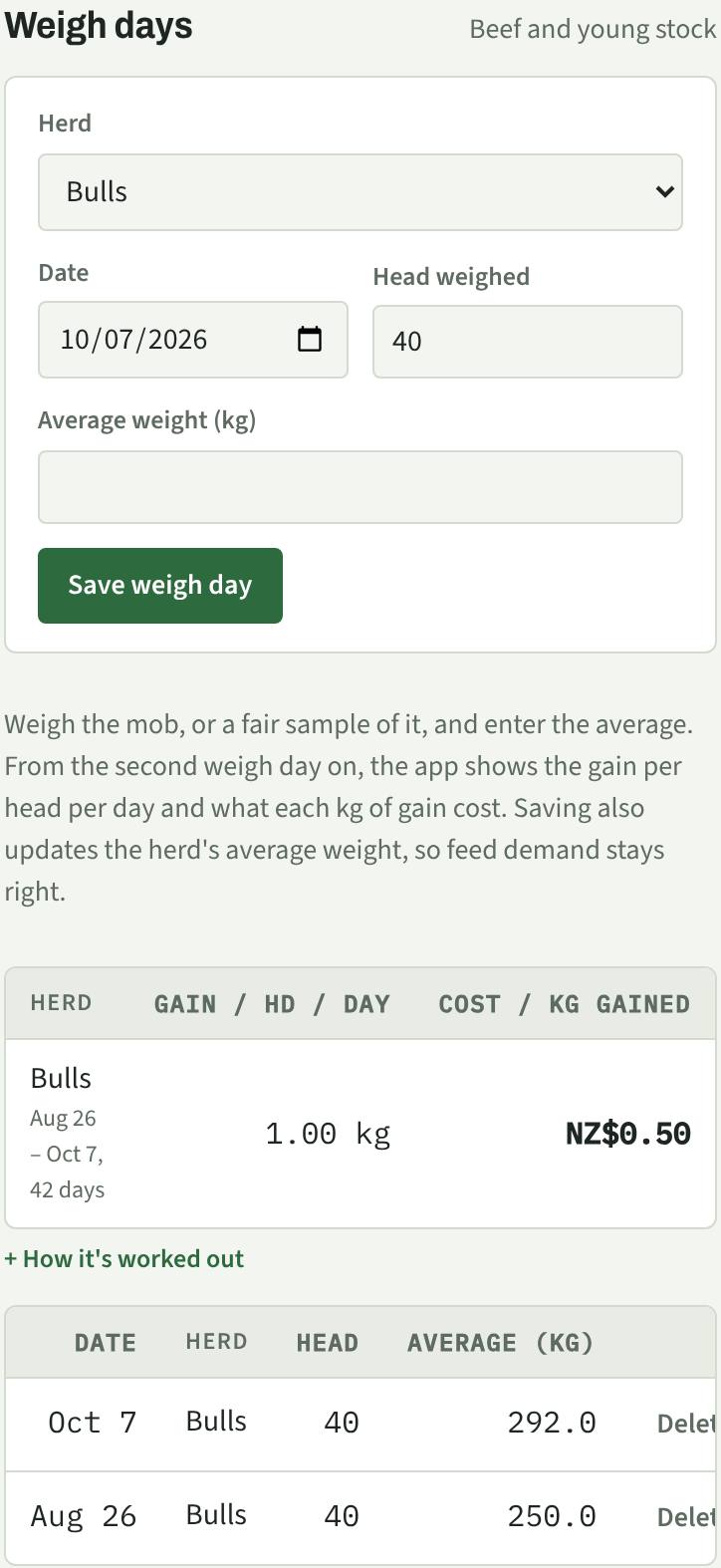
What the app works out: (292 − 250) ÷ 42 days = 1.0 kg a head a day, so 40 bulls gained 1,680 kg. $840 of costs ÷ 1,680 kg = $0.50 per kg gained. Saving also updates the herd's weight so feed demand stays right.
10Record fertiliser or effluent
On Fertiliser, pick the product. The usual NZ rate and the price per tonne fill in; change them if yours are different. Tick the paddocks (or "Just grazed") and the cost works itself out.
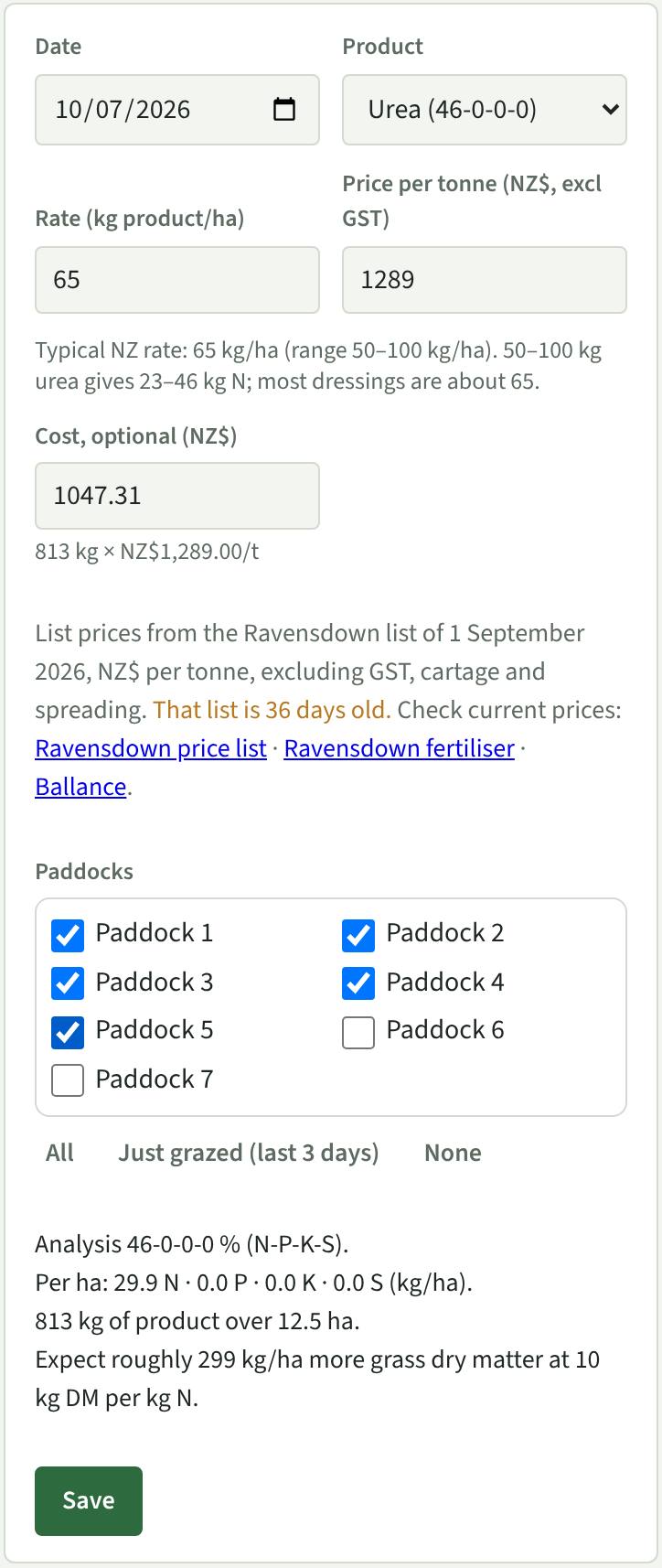
What the app works out: 65 × 12.5 = 812 kg of urea × $1,289 per tonne = $1,047. Urea is 46% N, so that's 30 kg N/ha, about 300 kg DM/ha of extra grass. It warns you if a paddock would go over 50 kg N/ha in one go or 190 kg N/ha in a year. Effluent is entered as depth in mm.
Prices: list prices are usually before tax, cartage and spreading (the list says which). Use the links under the form to check current prices.
Reading the results
11Check the Overview
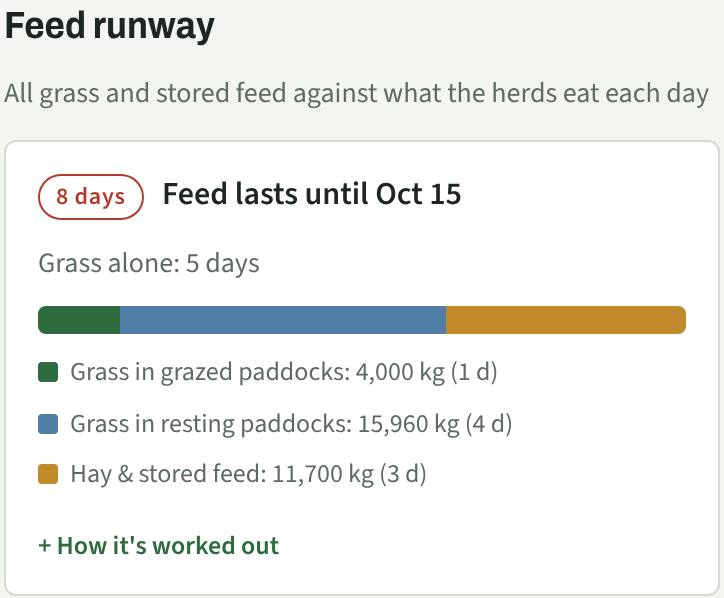
- Feed runway: how many days your grass plus stored feed lasts, and the date it runs out if nothing grows.
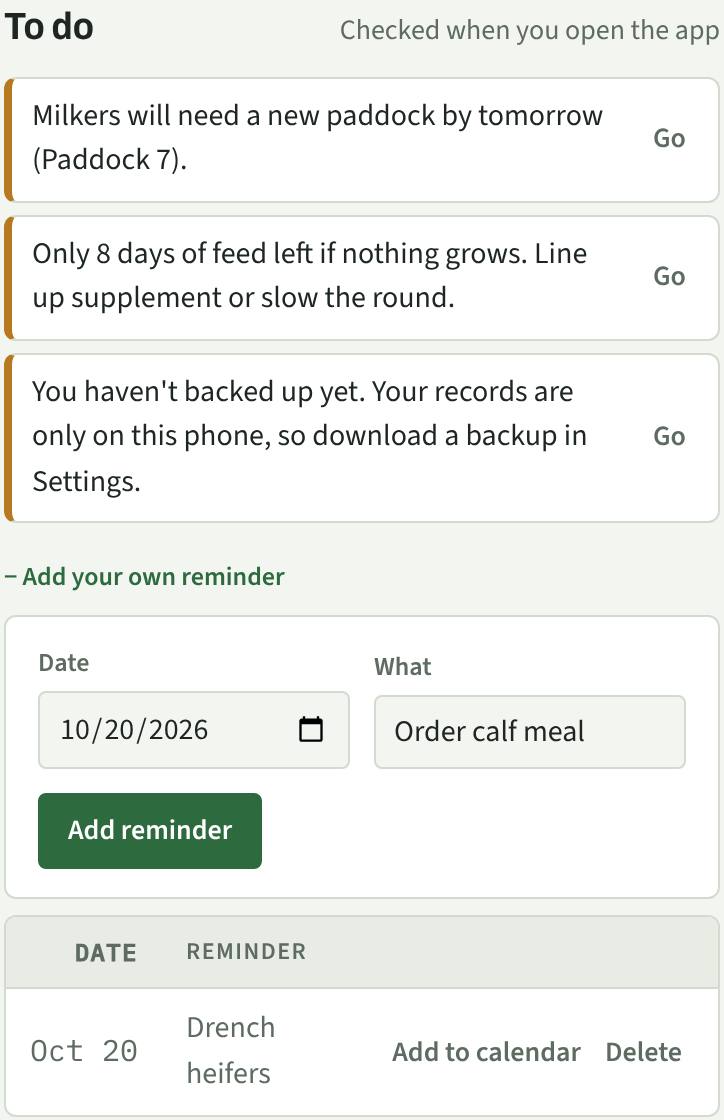
- To do: what needs doing now, such as a herd running out of grass, a farm walk that's due, low feed or a backup. Add your own reminders too (drenching, vet, ordering feed); each one can go in your phone's calendar so it alerts you even with the app closed.
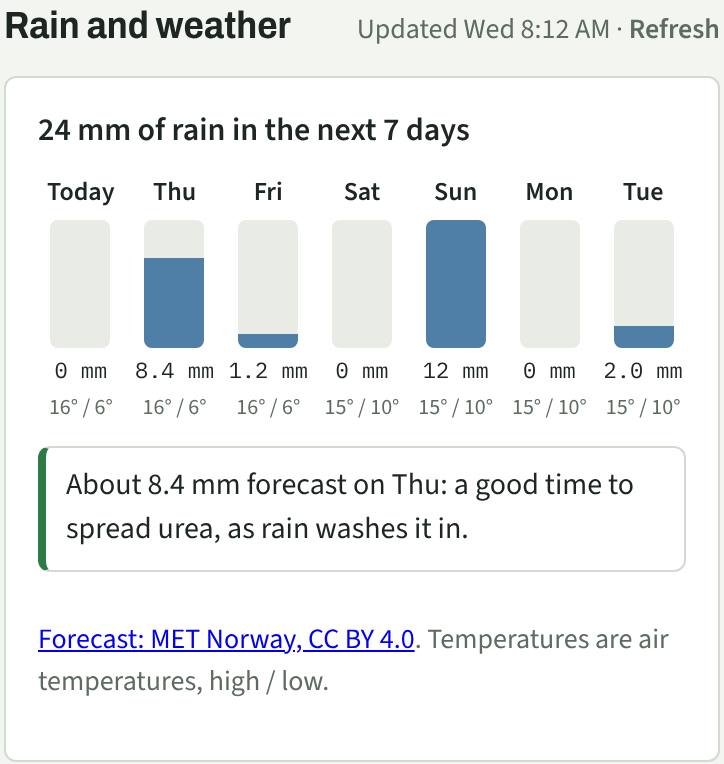
- Rain and weather: rain and temperatures for the next 7 days, with tips such as "a good time to spread urea" before light rain or "hold off effluent" before heavy rain.
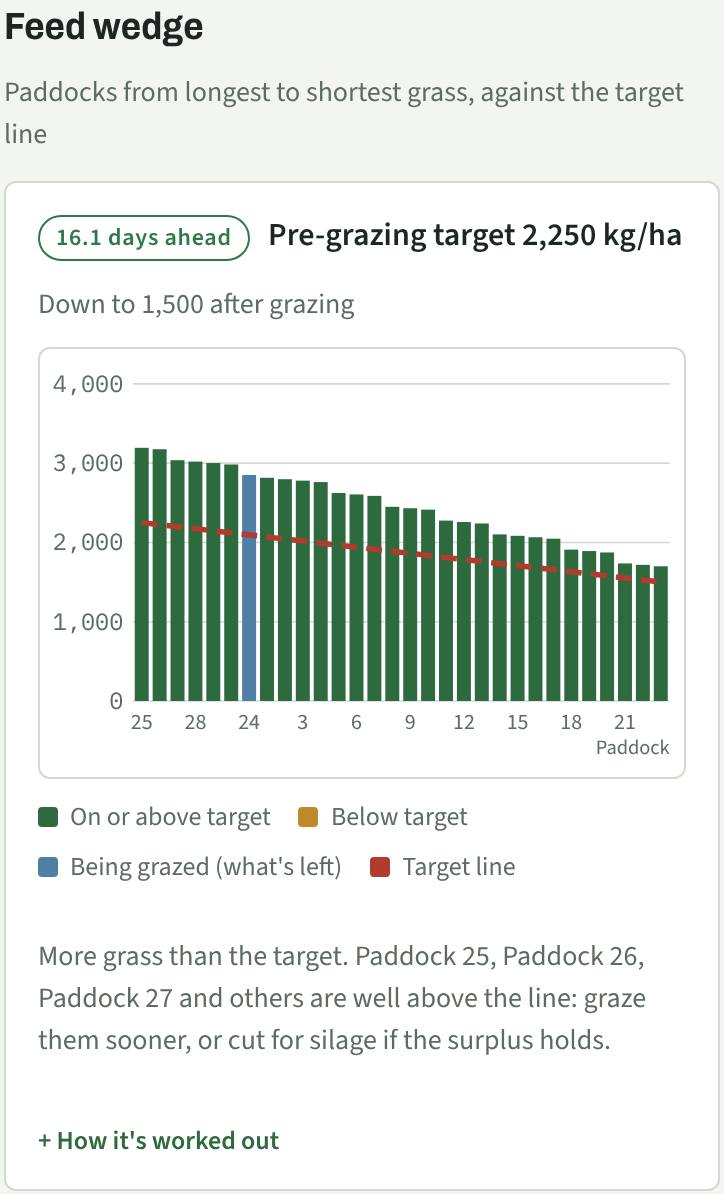
- Feed wedge: every paddock as a bar, longest grass first, with a dashed target line. Bars above the line mean spare grass (graze sooner or make silage); below means you are short (slow the round, feed supplement or apply N). The pill says how many days of feed you are ahead or behind.
- Paddocks in use and Resting: where each herd is, and when each paddock is ready again.
- Spend by month: costs by category.
Tap "How it's worked out" under any figure to see the sum behind it.
12Back up your records
Your records live on this phone only. Every week or so, go to Settings → "Your records" and save a backup file somewhere safe (email it to yourself or put it in Google Drive). "Restore from backup" brings it back on a new phone.
Small blocks
13Switch to small block
On a lifestyle block, open Settings and set "What kind of place" to Small block. The dairy screens (fertiliser, milk, feed wedge, calf costs) are hidden and a Bees tab appears. Herds, paddocks, costs and weather all work the same.
14Bees: hive checks and the disease return
Add each hive and the apiary it sits in. After each check, tap what you saw: queen, eggs, the AFB check and, if you did a wash, mites per 100 bees. If you tick Suspect or AFB found, the To do list reminds you to report it within 7 days. From 1 April the Bees tab shows your Annual Disease Return figures, ready to copy into HiveHub before 1 June.
15NAIT for cattle and deer
On Herds, note every time cattle or deer arrive, leave, die or are born. The app shows the deadline (48 hours for moves and deaths, 180 days to tag calves) and keeps it on the To do list until you tap "Done in NAIT". Pick the herd and its head count updates too.
16Gear: services and jobs
On Gear, add the quad, pump, chainsaw and fences with how many months between services. Tap "Done today" after a service, or log a job with its cost (the cost goes into Feed & costs). Anything due in the next two weeks shows on the To do list.
Words used in the app
- AFB
- American foulbrood, a bee disease every NZ beekeeper must report within 7 days of finding it.
- NAIT
- The national system that tracks cattle and deer. Every move, death and new calf has to be recorded there.
- Dry matter (DM)
- What's left of feed once the water is taken out. Grass is mostly water, so everything is measured in DM to compare like with like.
- Cover
- How much grass is in a paddock, in kg DM per hectare. Ankle high is about 2,300; mid-calf is about 3,100.
- Residual
- The grass you leave behind after grazing, usually about 1,500 kg DM/ha (4 cm).
- Rest days
- How long a paddock regrows before it's grazed again: about 21 days in spring, 70 in winter.
- Growth rate
- How much grass grows per hectare per day, worked out from two farm walks.
- Feed runway
- How many days of feed you have left at today's herd size.
Want to try before entering your own farm? Load the example farm in Settings, have a look around, then clear the examples.